The Most/Recent Articles

Contents in Sparse Mirror may be Smaller than they Appear

Contents in Sparse Mirror may be Smaller than they Appear


By Matthew Seyer

As many of you know, David Cowen and I are huge fans of file system journals! This love also includes all change journals designed by operating systems such as FSEvents and the $UsnJrnl:$J. We have spent much of our Dev time writing tools to parse the journals. Needless to say, we have lots of experience with file system and change journals. Here is some USN Journal logic for you.

USN Journal Logic

First off it is important to know that the USN Journal file is a sparse file. MSDN explains what a sparse file is: https://msdn.microsoft.com/en-us/library/windows/desktop/aa365564(v=vs.85).aspx. When the USN Journal (referred to as $J from here on out) is created it is created with a max size (the area of allocated data) and an allocation delta (the size in memory that stores records before it is committed to the $J on disk). This is seen here: https://technet.microsoft.com/en-us/library/cc788042(v=ws.11).aspx.

The issue is that many forensics tools cannot export a file out as a sparse file. Even if they could only a few file systems support them and I don’t even know if a sparse file on NTFS is the same as a sparse file on OSX. But this leads to a common problem. The forensic tool sees the $J as larger than it really is:

Contents in Sparse Mirror may be Smaller than they Appear


While this file is 20,380,061,592 bytes in size, the allocated portion of records is much smaller. Most forensic tools will export out the entire file with the unallocated data as 0x00. Which makes sense when you look at the MSDN Sparse File section (link above). When we extract this file out with FTK Imager we can verify with the windows command `fsutil sparse` to see that the exported file is not a sparse file (https://technet.microsoft.com/en-us/library/cc788025(v=ws.11).aspx):

Contents in Sparse Mirror may be Smaller than they Appear

 Trimming the $J

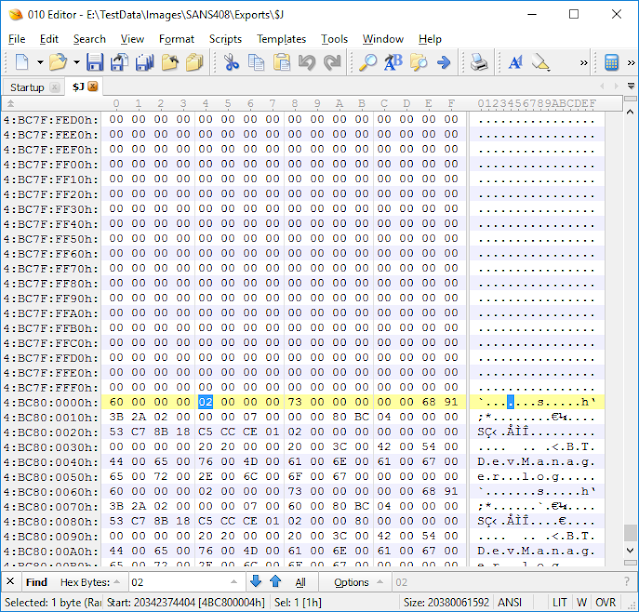
Once its exported out what’s a good way to find the start of the records? I like to use 010 Editor. I scroll towards the end of the file where there are still empty blocks (all 0x00s) then I search for 0x02 as I know I am looking for USN Record version 2:

Contents in Sparse Mirror may be Smaller than they Appear


Now if I want to export out just the record area I can start at the beginning of this found record and select to the end of the file and save the selection as a new file: 

Contents in Sparse Mirror may be Smaller than they Appear

The resulting file is 37,687,192 bytes in size and contains just the record portion of the file.


Contents in Sparse Mirror may be Smaller than they Appear

This is significantly smaller in size! Now, how do we go about this programmatically?

Automation

While other sparse files can have interspersed data, the $J sparse file keeps all of its data at the end of the file. This is because you can associate the Update Sequence Number in the record to the offset of the file! If you want to look at the structure of the USN record here it is: https://msdn.microsoft.com/en-us/library/windows/desktop/aa365722(v=vs.85).aspx. Now I will note that I would go about this two different ways. One method for a file that has been extracted out from one tool and a different method for if it would be extracted out using the TSK lib. But for now, we will just look at the first scenario.

Because the records are located in the lasts blocks of the file, I would start from the end of the file and work our way backwards to find the first record, then write out just the records portion of the file. This saves a lot of time because you are not searching through potentially many gigs of zeros. You can find the code at https://github.com/devgc/UsnTrimmer. I have commented the code so that it is easy to understand what is happening.

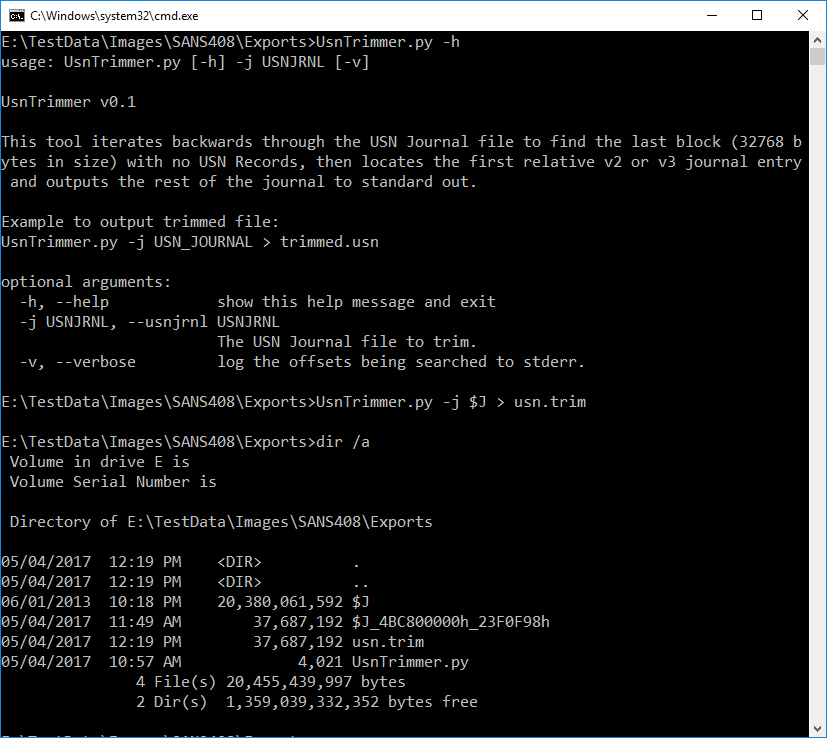
Now lets use the tool:
Contents in Sparse Mirror may be Smaller than they Appear

We see that the usn.trim file is the same as the one we did manually but lets check the hash to make sure we have the same results as the manual extract:

Contents in Sparse Mirror may be Smaller than they Appear

So far I have verified this on SANS408 image system $J extract and some local $J files. But of course, make sure you use multiple techniques to verify. This was a quick proof of concept code.

Questions? Ask them in the comments below or send me a tweet at @forensic_matt


Forensic Lunch with Paul Shomo, Matt Bromiley, Phil Hagen, Lee Whitfield and David Cowen

Forensic Lunch with Paul Shomo, Matt Bromiley, Phil Hagen, Lee Whitfield and David Cowen


Hello Reader,
     It's been awhile since I've cross posted that the videocast/podcast went up. We had a pretty great forensic lunch with lots of details about programs that are relevant frome everyone from academic students in forensics to serious artifact hunters. Here are the show notes:


Paul Shomo comes on to talk about Guidance Software's new Forensic Artifact Research Program where you can get $5,000 USD just for research you are already doing! Find out more here:


https://bugcrowd.com/guidancesoftware?preview=114da7695ff86ae70ec01aaf2c6878b0&utm_campaign=9617-Forensic_artifact-20170426&utm_medium=Email&utm_source=Eloqua

Phil Hagen introduced the new SANS Network Forensics poster to be released later this month

Matt Bromiley is talking about the Ken Johnson Scholarship setup by SANS and KPMG you can learn more and apply here https://digital-forensics.sans.org/blog/2017/03/03/ken-johnson-dfir-scholarship

Phil, Matt, Lee and I talked about the DFIR Summit

Lee Whitfield and I talked about the 4Cast Awards, Voting is open here:


https://forensic4cast.com/forensic-4cast-awards/


You can watch the lunch here:


You can listen to the podcast here:


Or you can subscribe to it on iTunes, Stitcher, Tunein and any other quality podcast provider. 


Windows, Now with built in Anti Forensics!

Windows, Now with built in Anti Forensics! by David Cowen - Hacking Exposed Computer Forensics Blog


Hello Reader,

Update: TZWorks updated USP in November of 2016 and it now not only shows these removed devices but if you pass in the -show_other_times flag it will tell you when the devices were removed. Very cool!

             If you've been using a tool to parse external storage device storage devices that relies on USB, USBStor, WPDBUSENUM or STORAGE as its primary key for fining all external devices you might be being tricked by Windows. Windows has been doing something new (to me at least) that I first observed in the Suncoast v Peter Scoppa et al case (Case No. 4:13-cv-03125) back in 2015 where Windows on its own and without user request is removing unused device entries from the registry on a regular basis driven by Task Scheduler.

This behavior that I've observed in my case work started in Windows 8.1 and I've confirmed it in Windows 10. A PDF I found that references this found here states he has seen it in Windows 7 but I can't confirm this behavior. The behavior is initiated from the Plug and Play scheduled task named 'Plug and Play Cleanup' as seen in the following screenshot:

Windows, Now with built in Anti Forensics! by David Cowen - Hacking Exposed Computer Forensics Blog


I've found very few people talking about this online and even fewer DFIR people who seem to be aware, I know we are going to add it to the SANS windows forensics course. According to this post on MSDN the scheduled task will remove from the most common device storage registry keys all devices that haven't been plugged in for 30 days. When this removal happens like all other PnP installs and uninstalls it will be logged in setupapi.dev.log and here is an example of such an entry:

">>>  [Device and Driver Disk Cleanup Handler]
>>>  Section start 2017/04/08 18:54:37.650
      cmd: taskhostw.exe
     set: Searching for not-recently detected devices that may be removed from the system.
     set: Devices will be removed during this pass.
     set: Device STORAGE\VOLUME\_??_USBSTOR#DISK&VEN_&PROD_&REV_PMAP#07075B8D9E409826&0#{53F56307-B6BF-11D0-94F2-00A0C91EFB8B} will be removed.
     set: Device STORAGE\VOLUME\_??_USBSTOR#DISK&VEN_&PROD_&REV_PMAP#07075B8D9E409826&0#{53F56307-B6BF-11D0-94F2-00A0C91EFB8B} was removed.
     set: Device SWD\WPDBUSENUM\_??_USBSTOR#DISK&VEN_&PROD_&REV_PMAP#07075B8D9E409826&0#{53F56307-B6BF-11D0-94F2-00A0C91EFB8B} will be removed.
     set: Device SWD\WPDBUSENUM\_??_USBSTOR#DISK&VEN_&PROD_&REV_PMAP#07075B8D9E409826&0#{53F56307-B6BF-11D0-94F2-00A0C91EFB8B} was removed.
     set: Device STORAGE\VOLUMESNAPSHOT\HARDDISKVOLUMESNAPSHOT13 will be removed.
     set: Device STORAGE\VOLUMESNAPSHOT\HARDDISKVOLUMESNAPSHOT13 was removed.
     set: Device STORAGE\VOLUMESNAPSHOT\HARDDISKVOLUMESNAPSHOT14 will be removed.
     set: Device STORAGE\VOLUMESNAPSHOT\HARDDISKVOLUMESNAPSHOT14 was removed.
     set: Device STORAGE\VOLUMESNAPSHOT\HARDDISKVOLUMESNAPSHOT15 will be removed.
     set: Device STORAGE\VOLUMESNAPSHOT\HARDDISKVOLUMESNAPSHOT15 was removed.
     set: Device STORAGE\VOLUMESNAPSHOT\HARDDISKVOLUMESNAPSHOT16 will be removed.
     set: Device STORAGE\VOLUMESNAPSHOT\HARDDISKVOLUMESNAPSHOT16 was removed.
     set: Device STORAGE\VOLUMESNAPSHOT\HARDDISKVOLUMESNAPSHOT17 will be removed.
     set: Device STORAGE\VOLUMESNAPSHOT\HARDDISKVOLUMESNAPSHOT17 was removed.
     set: Device STORAGE\VOLUMESNAPSHOT\HARDDISKVOLUMESNAPSHOT18 will be removed.
     set: Device STORAGE\VOLUMESNAPSHOT\HARDDISKVOLUMESNAPSHOT18 was removed.
     set: Device STORAGE\VOLUMESNAPSHOT\HARDDISKVOLUMESNAPSHOT19 will be removed.
     set: Device STORAGE\VOLUMESNAPSHOT\HARDDISKVOLUMESNAPSHOT19 was removed.
     set: Device STORAGE\VOLUMESNAPSHOT\HARDDISKVOLUMESNAPSHOT20 will be removed.
     set: Device STORAGE\VOLUMESNAPSHOT\HARDDISKVOLUMESNAPSHOT20 was removed.
     set: Device STORAGE\VOLUMESNAPSHOT\HARDDISKVOLUMESNAPSHOT21 will be removed.
     set: Device STORAGE\VOLUMESNAPSHOT\HARDDISKVOLUMESNAPSHOT21 was removed.
     set: Device STORAGE\VOLUMESNAPSHOT\HARDDISKVOLUMESNAPSHOT22 will be removed.
     set: Device STORAGE\VOLUMESNAPSHOT\HARDDISKVOLUMESNAPSHOT22 was removed.
     set: Device STORAGE\VOLUMESNAPSHOT\HARDDISKVOLUMESNAPSHOT23 will be removed.
     set: Device STORAGE\VOLUMESNAPSHOT\HARDDISKVOLUMESNAPSHOT23 was removed.
     set: Device STORAGE\VOLUMESNAPSHOT\HARDDISKVOLUMESNAPSHOT24 will be removed.
     set: Device STORAGE\VOLUMESNAPSHOT\HARDDISKVOLUMESNAPSHOT24 was removed.
     set: Device STORAGE\VOLUMESNAPSHOT\HARDDISKVOLUMESNAPSHOT25 will be removed.
     set: Device STORAGE\VOLUMESNAPSHOT\HARDDISKVOLUMESNAPSHOT25 was removed.
     set: Device STORAGE\VOLUMESNAPSHOT\HARDDISKVOLUMESNAPSHOT26 will be removed.
     set: Device STORAGE\VOLUMESNAPSHOT\HARDDISKVOLUMESNAPSHOT26 was removed.
     set: Device STORAGE\VOLUMESNAPSHOT\HARDDISKVOLUMESNAPSHOT27 will be removed.
     set: Device STORAGE\VOLUMESNAPSHOT\HARDDISKVOLUMESNAPSHOT27 was removed.
     set: Device USB\VID_13FE&PID_5200\07075B8D9E409826 will be removed.
     set: Device USB\VID_13FE&PID_5200\07075B8D9E409826 was removed.
     set: Device STORAGE\VOLUME\_??_USBSTOR#DISK&VEN_&PROD_&REV_PMAP#070A6C62772BB880&0#{53F56307-B6BF-11D0-94F2-00A0C91EFB8B} will be removed.
     set: Device STORAGE\VOLUME\_??_USBSTOR#DISK&VEN_&PROD_&REV_PMAP#070A6C62772BB880&0#{53F56307-B6BF-11D0-94F2-00A0C91EFB8B} was removed.
     set: Device USBSTOR\DISK&VEN_&PROD_&REV_PMAP\070A6C62772BB880&0 will be removed.
     set: Device USBSTOR\DISK&VEN_&PROD_&REV_PMAP\070A6C62772BB880&0 was removed.
     set: Device USB\VID_13FE&PID_5500\070A6C62772BB880 will be removed.
     set: Device USB\VID_13FE&PID_5500\070A6C62772BB880 was removed.
     set: Device SWD\WPDBUSENUM\_??_USBSTOR#DISK&VEN_&PROD_&REV_PMAP#070A6C62772BB880&0#{53F56307-B6BF-11D0-94F2-00A0C91EFB8B} will be removed.
     set: Device SWD\WPDBUSENUM\_??_USBSTOR#DISK&VEN_&PROD_&REV_PMAP#070A6C62772BB880&0#{53F56307-B6BF-11D0-94F2-00A0C91EFB8B} was removed.
     set: Device USBSTOR\DISK&VEN_&PROD_&REV_PMAP\07075B8D9E409826&0 will be removed.
     set: Device USBSTOR\DISK&VEN_&PROD_&REV_PMAP\07075B8D9E409826&0 was removed.
     set: Devices removed: 23
     set: Searching for unused drivers that may be removed from the system.
     set: Drivers will be removed during this pass.
     set: Recovery Timestamp: 11/11/2016 19:51:27:0391.
     set: Driver packages removed: 0
     set: Total size on disk: 0
<<<  Section end 2017/04/08 18:54:41.415
<<<  [Exit status: SUCCESS]"

Followed one of these for each device identified:
>>>  [Delete Device - STORAGE\VOLUME\_??_USBSTOR#DISK&VEN_&PROD_&REV_PMAP#07075B8D9E409826&0#{53F56307-B6BF-11D0-94F2-00A0C91EFB8B}]
>>>  Section start 2017/04/08 18:54:37.666
      cmd: taskhostw.exe
<<<  Section end 2017/04/08 18:54:37.704
<<<  [Exit status: SUCCESS]

Now the setupapi.dev.log isn't the only place these devices will remain. You will also find them in the following registry keys in my testing:
System\Setup\Upgrade\PnP\CurrentControlSet\Control\DeviceMigration\Classes\
System\Setup\Upgrade\PnP\CurrentControlSet\Control\DeviceMigration\Devices\SWD\WPDBUSENUM
System\Setup\Upgrade\PnP\CurrentControlSet\Control\DeviceMigration\Devices\USBSTOR
System\MountedDevices\
NTUSER,DAT\Software\Microsoft\Windows\CurrentVersion\Explorer\MountPoints2\

Note that these removals do not effect the shell items artifacts (Lnk, Jumplist, Shellbags) that would be pointing to files accessed from these devices, just the common registry entries that record their existence. 

So why is this important? If you are being asked to review external devices accessed in a Windows 8.1 or newer system you will have to take additional steps to ensure that you account for any device that hasn't been plugged in for 30 days. In my testing the Woanware USBDeviceForensics tool will miss these devices in their reports.

So make sure to check! It's on by default and there could be a lot of devices you miss.