The Most/Recent Articles

Showing posts with label extended mapi. Show all posts

Daily Blog #428: Forensic Lunch 7/20/18 - Discussion with Arman Gungor on Defcon CTF

Discussion with Arman Gungor on Defcon CTF


Hello Reader,
            We had a great Forensic Lunch today with our guest Arman Gungor (@armangungor) from metaspike.com, talking about his research posted on the meridian discovery blog (like this one https://www.meridiandiscovery.com/articles/email-attachment-timestamps-forensics-outlook/ ) and his work on Forensic Email Collector. Matt and I also talked about the upcoming Defcon CTF and our planned live streams from Defcon providing commentary.

The video got split into two due to broadcasting software issues so here is the first video with Arman:


And here is the second video with Matt and I talking about 
the CTF


There will be another Forensic Lunch next Friday 7/27/18, looking forward to seeing you then!

owa

Daily Blog #418: Exploring Extended MAPI Part 19

Exploring Extended MAPI Part 19 by David Cowen - Hacking Exposed Computer Forensics Blog


Hello Reader,
         Since my last test that showed that the Extended MAPI data wasn't be updated when I modified a message in OWA in my local outlook client I've been testing ways to get this updated data.

First I tried to download my mailbox, but apparently I need to get a working EWS url first. So I'll try that again tomorrow.

Second I went into the compliance center and searched for and found my test message I've been experimenting with. In doing this I downloaded the original message in EML format (the only option given) and I still did not find the updated extended MAPI data as seen below:

Exploring Extended MAPI Part 19 by David Cowen - Hacking Exposed Computer Forensics Blog

Here the Last Modification time got set to when I downloaded the message from Compliance Center and the original submission time exists. But I have no Last Verb time or code showing this message was replied too.

Third I emailed myself the message in OWA as an attachment by drag and dropping the message into a new email, this actually put the message as a MSG attached to the email message. Once I accessed this within Outlook in my local system I was able to see the expected data:

Exploring Extended MAPI Part 19 by David Cowen - Hacking Exposed Computer Forensics Blog


Here you can see that we finally have the expected Last Verb time showing when the message was replied to and when it was replied to. The Last Modification has been updated to reflect when I sent the message to myself as an attachment.


So I now need to download the mailbox fresh and then look into my local outlook account to see if this data has finally been updated.


This is a 19-part series on Exploring Extended MAPI. You can find the rest of the posts here. 
owa

Daily Blog #414: Exploring Extended MAPI Part 18

Exploring Extended MAPI Part 18 by David Cowen - Hacking Exposed Computer Forensics Blog


Hello Reader,
         I'm in the BKK airport heading to Phuket today in my continued adventures. Got here nice and early so now I'm at the gate writing a blog post! After my last post I'm very curious now about what other actions I take in OWA will effect my already downloaded Outlook mail. So to get a base line I'm doing something that I think will for sure modify the message on both sides, I'm reply to the message.

In my initial testing, replying to a message in OWA for a message I sent through Outlook connected to the same account, I brought up the original message and inspected the Extended MAPI to find there was No Change!

Meaning that the message wasn't marked a replied to and within outlook it didn't recognize the conversation thread within the message. Something very interesting is happening.

I'm going to attempt to restart Outlook and see if I can get it resync everything but this certainly changes how I'm going to have to approach these investigations. I need to start pulling the data from exchange directly to see if doing that will update the metadata.


This is a 19-part series on Exploring Extended MAPI. You can find the rest of the posts here. 

Daily Blog #413: Exploring Extended MAPI Part 17

Exploring Extended MAPI Part 17 by David Cowen - Hacking Exposed Computer Forensics Blog


Hello Reader,
            With all the talk about the Office 365 API I thought it might be worth testing how OWA (Outlook Web Access) accesses in Office 365 modified my local sync'd Outlook OST. This is important as there are many situations where the victim and the attacker are accessing the same mailbox in different forms and knowing what to expect when you do your analysis is important.

So the first thing I did today was to mark an item unread in OWA and then I sync'd my Outlook folders and saw the message go unread. After which I pulled up the Extended MAPI data within Outlook Spy and well, it didn't go as I expected.

When I looked at the last modification I found this:

Exploring Extended MAPI Part 17 by David Cowen - Hacking Exposed Computer Forensics Blog

Which is showing that even though the message was marked unread and read again that the last modification time didn't change from the time it was originally. In fact going through all the dates i didn't find any updates made at all.

I think next I need to retrieve the message directly to test it again but tomorrow I'll be doing more Outlook testing.

This is a 19-part series on Exploring Extended MAPI. You can find the rest of the posts here. 

Daily Blog #411: Exploring Extended MAPI Part 16

Exploring Extended MAPI Part 16 by David Cowen - Hacking Exposed Computer Forensics Blog


Hello Reader,
                 I decided to test a Microsoft Word attachment this time to see if the results would be any different. In the end the results were the same but I need to do one more test tomorrow to see if the internal metadata varies from the file system metadata if their is any difference.

Here is the original file metadata:

Exploring Extended MAPI Part 16 by David Cowen - Hacking Exposed Computer Forensics Blog


This is the Extended MAPI properties of the attachment

Exploring Extended MAPI Part 16 by David Cowen - Hacking Exposed Computer Forensics Blog

Again the creation time is being set to when the message was sent, this is different than Arman's testing so I'm trying to see what I'm doing different. I'll know for sure when he comes on the Forensic Lunch this month.

Here is the resulting metadata of the saved file:

Exploring Extended MAPI Part 16 by David Cowen - Hacking Exposed Computer Forensics Blog

More testing to come!


This is a 19-part series on Exploring Extended MAPI. You can find the rest of the posts here. 

Daily Blog #408: Exploring Extended MAPI Part 15

Exploring Extended MAPI Part 15 by David Cowen - Hacking Exposed Computer Forensics Blog


Hello Reader,
            Another Friday where I'm not able to get a forensic test kitchen done due to my travel and teaching schedule but next week should be better!

Instead lets continue our outlook attachment testing, in the prior post I tested a png file. Let's test an Microsoft Excel document now to see how a file with a metadata structure Outlook would know effects our testing.

First here is the metadata on the file on the disk:

Exploring Extended MAPI Part 15 by David Cowen - Hacking Exposed Computer Forensics Blog

Here is the extended mapi properties of the attachment when I sent the message a minute after creating the file.

Exploring Extended MAPI Part 15 by David Cowen - Hacking Exposed Computer Forensics Blog


As you can see the last modification time is being preserved again but the creation time is actually being set to the message creation time as seen in the delivery time below.

Exploring Extended MAPI Part 15 by David Cowen - Hacking Exposed Computer Forensics Blog

I then made sure it wasn't just a rounding issue by sending the same attachment the next day

Exploring Extended MAPI Part 15 by David Cowen - Hacking Exposed Computer Forensics Blog

which shows that the creation time is being sent to the date the message was sent and the modification time of the file is being preserved.

Saving the attachment back to the disk gives the following dates


Exploring Extended MAPI Part 15 by David Cowen - Hacking Exposed Computer Forensics Blog

As we can see the creation time is being set to when the message was sent and the modification time is being reapplied. The Access date appears to be updated but really that's just the real creation time before Microsoft Outlook rolled back the date.

More to come as we test other formats!


This is a 19-part series on Exploring Extended MAPI. You can find the rest of the posts here. 

Daily Blog #407: Exploring Extended MAPI Part 14

Exploring Extended MAPI Part 14 by David Cowen - Hacking Exposed Computer Forensics Blog


Hello reader,
        In yesterdays post I showed how saving an attachment applied the modification date that was stored within the attachment extended mapi properties. I was wondering how from a filesystem perspective you could tell the actual date the file was saved to the disk and as it turns out the filename attribute metadata has the dates the attachment was actually saved to the disk as seen below:


This is a png file, in the upcoming posts I'll be trying other file types to see if Outlook shows any different behaviors.


This is a 19-part series on Exploring Extended MAPI. You can find the rest of the posts here. 

Daily Blog #406: Exploring Extended MAPI Part 13

Exploring Extended MAPI Part 13 by David Cowen - Hacking Exposed Computer Forensics Blog


Hello Reader,
           In my prior post I was looking at the file system metadata stored based on Arman's blog post. In this post I wanted to see if something had changed with how Outlook was assigning creation times on saving a file. In the past I had found that Outlook would look into Word documents and retrieve the dates from the metadata in the document to apply to the file system, and in this post I am looking to see if that has changed.

I haven't tested a regular file before in looking to see what dates got applied and when I saved the attachment to my disk I was surprised to see the following

Exploring Extended MAPI Part 13 by David Cowen - Hacking Exposed Computer Forensics Blog
The creation time was sent to the time the message was received and matched the PR_CREATION_TIME I saw in the prior post. But the Modification time was reapplied from the data that was saved in the attachment extended mapi property! Notice that the Access time is set for today even though access times have been disabled since Windows 10. This because the access time is being set to the actual time of creation and then the other two dates have been rolled back by Outlook.

This is very interesting to me and I plan on testing this with some more file types this week and next.

Continue Reading: Daily Blog #405 - Exploring Extended MAPI Part 12

This is a 19-part series on Exploring Extended MAPI. You can find the rest of the posts here. 

Daily Blog #405: Exploring Extended MAPI Part 12

Exploring Extended MAPI Part 12by David Cowen - Hacking Exposed Computer Forensics Blog


Hello Reader,
           For today's post I've wanted to share some testing I've been doing of Arman Gungor's research into Extended MAPI data. Arman has agreed to come on the Forensic Lunch next month and talk about his work and this post I'd like to focus on some research he's done on how some file system timestamps are preserved from the sender's system when a file is attached in Outlook.

First you can read Arman's post here:

https://www.meridiandiscovery.com/articles/email-attachment-timestamps-forensics-outlook/

I emailed myself one of the pictures from Saturday's solution post and then examined the Extended MAPI data of the attachment with Outlook spy to see if I could confirm what Arman found.

Here are the file system timestamps on my system for pic10.png:
Exploring Extended MAPI Part 12by David Cowen - Hacking Exposed Computer Forensics Blog

Looking at the Extended MAPI for the attachment I found the following. For the creation time I have the creation time of the message rather than the file attachment. The time is displayed is in UTC and I'm currently in is UTC +10.

Looking at the Modification time though we do find the correct file system time:

Which +10 hours is 6/24/18 at 6:14PM.

This is fascinating to me as I thought all file system metadata was stripped away when a file was attached. I am going to do more testing with Outlook attachments and the dates applied to see how these changes my prior results.

This is a 19-part series on Exploring Extended MAPI. You can find the rest of the posts here. 

Daily Blog #404: Exploring Extended Mapi Part 11

Exploring Extended Mapi Part 11 by David Cowen - Hacking Exposed Computer Forensics Blog


Hello Reader,
          In this post I want to follow up on an earlier post questioning what was left behind in a forwarded message extended MAPI wise that would allow an examiner to know more about the message. Well it's appropriate that this is Daily Blog 404 because within the extended MAPI i did not find any of the original dates contained in a property.

I still need to decode the conversation index though and I'll be working on that tomorrow as well as putting all of the logic into python code to automate this process.


This is a 19-part series on Exploring Extended MAPI. You can find the rest of the posts here. 

Daily Blog #399: Exploring Extended MAPI Part 10

Exploring Extended MAPI part 10 by David Cowen - Hacking Exposed Computer Forensics Blog


Hello Reader,
          In yesterdays post, i'm in the middle of a 37 hour journey to Sydney so its all a blur to me, we talked about the ClientInfo propert within the extended MAPI data. I was talking about how this property could be found in sent messages but didn't consider that MAPI data from a sender would be carried over to the receiver in terms of how the message was sent.

Well, I was wrong! It turns out in my testing that atleast messages sent within an exchange server retain the ClientInfo property of the sender on the messages received and stored by the recipients. I went though emails I received from my coworkers and when I did I found a range of ClientInfo strings two of which I'm going to talk about in the post.

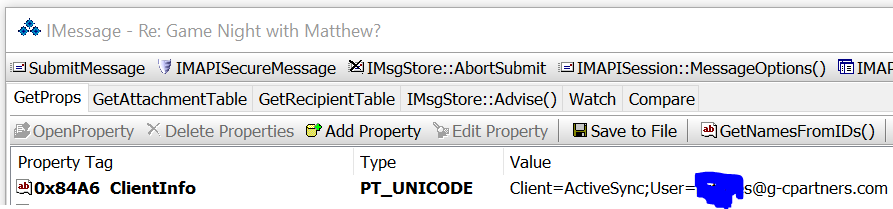
The first is one of my coworkers emailing me from his phone:
Exploring Extended MAPI part 10 by David Cowen - Hacking Exposed Computer Forensics Blog


As you can see not only did it provide the method of connection, in this case ActiveSync meaning it was sent from a phone, but also the email address associated with the ActiveSync connection.

In this example one of coworkers was using OWA and rather than try to make a screenshot of a long string I just copied it out of the property:

"Client=OWA;Mozilla/5.0(WindowsNT10.0;Win64;x64)AppleWebKit/537.36(KHTML,likeGecko)Chrome/66.0.3359.181Safari/537.36;"

Here I can tell it was sent via Webmail (OWA) the version of Windows (Windows 10) and what web browser (Chrome) and profile all the messages they've sent me. 

My first instinct was this must be some new X-mpailer entry and this data must be in the header. So I loaded up the header and did not find a X-mailer header entry or any entry that appears to store this data. I saw this but there are multiple base64 encoded entries in the headers now that I will start going through tomorrow, but on its face this ClientInfo property is not in the headers and it is being populated/provided within an Exchange server organization.

So how would I use this in a case? Let's say I'm trying to identify when an internal user stared sending emails from an attacker who lets just say was trying to get a wire transfer sent out. Well alot of the good attackers will delete their sent messages, so now you can get through all the messages the employees received and identify even faster which ones came from the attacker by isolating which Clients which employees were using and which the attacker was using.

As this series continues I'll be writing python code to automate this analysis and I'm looking forward to finding out what all we can mine out!

Continue Reading: Daily Blog #398 - Exploring Extended MAPI Part 9

This is a 19-part series on Exploring Extended MAPI. You can find the rest of the posts here. 

Daily Blog #398: Exploring Extended MAPI Part 9

Exploring Extended MAPI Part 9 - by David Cowen - Hacking Exposed Computer Forensics Blog


Hello Reader,
           As I write this I'm flying over Canada and on my way to Sydney via Dubai. Satellite inflight internet really is an amazing thing!

In this post I was going to talk about what was set on the message I forwarded and received yesterday but as I was looking at the extended MAPI fields in OutlookSpy I noticed that several had no description next to them but had dates:

Exploring Extended MAPI Part 9 - by David Cowen - Hacking Exposed Computer Forensics Blog


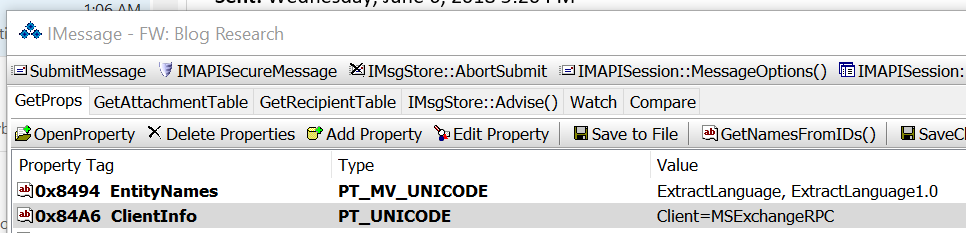
This was interesting to say the least which sent me on some extensive Googling where I ran across yet another interesting piece of data. There is a MAPI property only set on sent messages that records the type of Client connection that existed when the message was sent.

This was the Client connection type for the message I forwarded to myself sitting in my sent box:

Exploring Extended MAPI Part 9 - by David Cowen - Hacking Exposed Computer Forensics Blog

I found an exchange blog from 2016 about this field: https://gsexdev.blogspot.com/2016/02/mining-clientinfo-property-in-messages.html?view=classic

Now what is interesting to me is three fold:
1. The property tag has changed since 2016 from 0x866F to 0x84A6, which means some reading up on MSDN is order to figure out if there was a reason why
2. My ClientInfo property is showing I sent this using the ExchangeRPC connection from Outlook.
3. The blog post I referenced above showed not just Exchange or OWA but also useragent data from web browsers!

I think this is something we could profile sent messages in a mailbox from. Not only to see messages sent via mobile versus desktop, but also to profile and find all the messages an attacker forwarded or replied to when they were accessing someones mailbox.

I plan to do some testing on this property this week, but I'll need a bit more bandwidth than what this satellite wifi connection can do to do so. So until tomorrow, thanks for reading!


This is a 19-part series on Exploring Extended MAPI. You can find the rest of the posts here. 

Daily Blog #397: Exploring Extended MAPI Part 8

Exploring Extended MAPI Part 8 by David Cowen - Hacking Exposed Computer Forensics Blog


Hello Reader,
                   In this post I wanted to look at more actions and their effect on Extended MAPI. Today I'm looking at what a forward does to a message.

After forwarding the message you can see that within Outlook it is notifying me that the message was forwarded and when.

by David Cowen - Hacking Exposed Computer Forensics Blog


This data we know is stored in the PR_LAST_VERB_EXECUTED extended mapi flag and inspecting those values does confirm this

by David Cowen - Hacking Exposed Computer Forensics Blog


Notice that this time is being stored UTC within the extended mapi property but displayed to the user in local time.

The same is true for the other timestamp that has been updated which is PR_LAST_MODIFICATION_TIME

by David Cowen - Hacking Exposed Computer Forensics Blog


PR_LAST_MODIFICATION_TIME is also reflecting that it is stored in UTC and is being updated because the LAST_VERB_EXECUTED values have been set.

In my review of the message I forwarded those were the only two timestamps that were altered. Tomorrow let's look at the received message to see if anything was retained.


This is a 19-part series on Exploring Extended MAPI. You can find the rest of the posts here. 

Daily Blog #393: Exploring Extended MAPI Part 7

Exploring Extended MAPI Part 7 by David Cowen - Hacking Exposed Computer Forensics Blog


Hello Reader,
          I've been wondering in the last several posts about what happens to exported messages when different users edit the message. I finally got a chance to test this today and document my results here. To do this I exported a message from my SANS FOR500 instructor laptop on to a USB external storage device.

Once I exported the message I loaded up the message on my SANS instructor laptop and with Outlook spy inspected the last modification time and name.

Exploring Extended MAPI Part 7 by David Cowen - Hacking Exposed Computer Forensics Blog


Next I took that external storage device and I plugged it into my surface book where I usually write these blog posts and opened up the message from the external storage drive to see if just opening it as another user would change this data.

Exploring Extended MAPI Part 7 by David Cowen - Hacking Exposed Computer Forensics Blog

As you can see nothing changed which is what I was hoping would be true.

However what happened next surprised me. In order to try to modify the message and get the Extended MAPI fields to update with my work email address of dcowen@g-cpartners.com I did the following:

1. I set a follow up flag as completed
2. I replied to the message
3. I removed a file attachment from the message

After I did each step I checked the Extended MAPI and found that the values didn't change! This is what the Extended MAPI fields looked like after I did all three things.

Exploring Extended MAPI Part 7 by David Cowen - Hacking Exposed Computer Forensics Blog

Notice that PR_LAST_MODIFIER_NAME_W and PR_LAST_MODIFICATION_TIME have not changed from the prior screenshot. However notice that PR_LAST_VERB_EXECUTED was set to a reply value (102) and that the PR_LAST_VERB_EXECUTION_TIME had been updated to reflect when i replied to the message on my surface book.

Now I was doing these against the exported message directly without bringing it back into Outlook. Next week I will attempt to import a message into Outlook from an exported message from another mailbox and see if this behavior changes.


This is a 19-part series on Exploring Extended MAPI. You can find the rest of the posts here. 

Daily Blog #392: Exploring Extended MAPI Part 6

Exploring Extended MAPI Part 6 by David Cowen - Hacking Exposed Computer Forensics Blog


Hello Reader,
        I will continue my testing next week with multiple user accounts modifying a message but one thing has caught my attention. I have noticed that for Office 365 atleast the X-Originating IP header has returned and id also present in the Extended MAPI data.

As seen below the test message I have been working with and replying to has an X-Originating IP header set.

Exploring Extended MAPI Part 5 by David Cowen - Hacking Exposed Computer Forensics Blog

This is interesting to me as for some time most services have been dropping this header or placing the IP address of the mail server in its place. In this case its showing the IP address of the Tmobile NAT gateway since I was connected to my phone's hotspot when I sent this message.

I need to test this again using the web interface but I'm always happy when old useful headers come back to life.


This is a 19-part series on Exploring Extended MAPI. You can find the rest of the posts here. 

Daily Blog #391: Exploring Extended MAPI Part 5

Exploring Extended MAPI Part 5 by David Cowen - Hacking Exposed Computer Forensics Blog


Hello Reader,
           In the prior post we went thought what dates were preserved when a message was exported out of a mailbox and into a PST. I put forth the question to myself what would happen if I then took that exported message and copied it to another volume, what would change within the message?

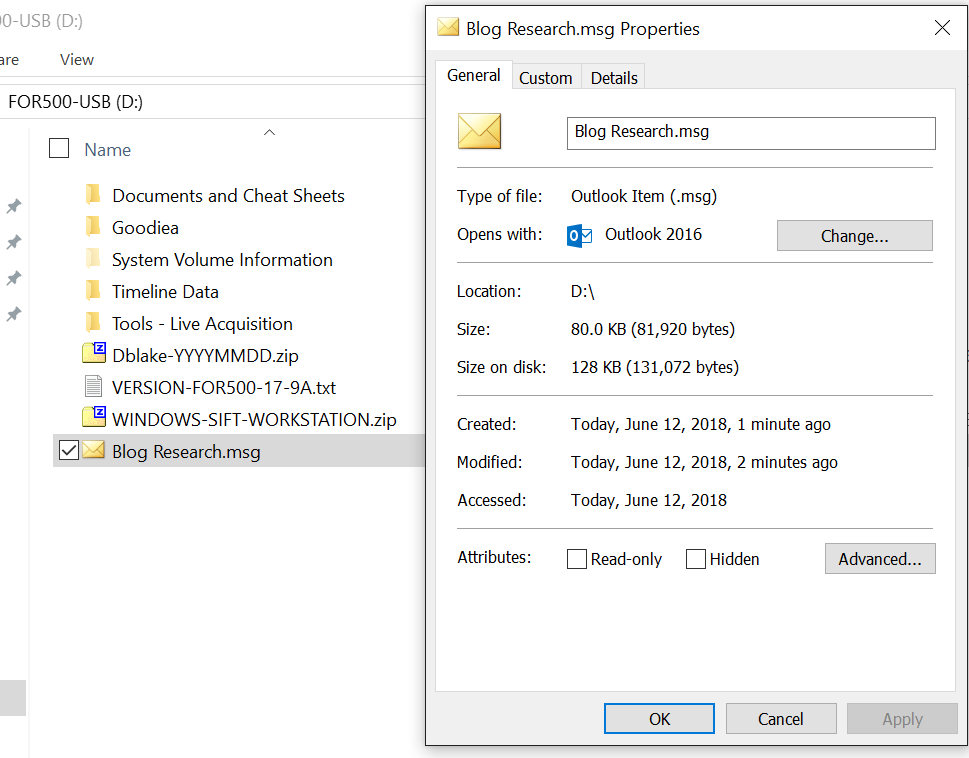
I copied the MSG file to an external drive with an exFAT file system using the explorer copy/paste operation. Here is what the file system metadata looked like.

Exploring Extended MAPI Part 5 by David Cowen - Hacking Exposed Computer Forensics Blog


Looking at the message copied onto the external storage volume i checked the PR_CREATION_TIME first and found the original creation date when the message was exported out of the mailbox was preserved even though the file system creation time had been updated to the time of copy.

Exploring Extended MAPI Part 5 by David Cowen - Hacking Exposed Computer Forensics Blog

In addition the PR_LAST_MODIFICATION_TIME also retained the original date even though the file system modification time was updated.

Exploring Extended MAPI Part 5 by David Cowen - Hacking Exposed Computer Forensics Blog

I've noticed some other interesting mapi attributes including the names of the and sid's of the users who modified a message. Next let's see how those are set and updated.


This is a 19-part series on Exploring Extended MAPI. You can find the rest of the posts here. 

Daily Blog #390: Exploring Extended MAPI Part 4

Exploring Extended MAPI Part 4 by David Cowen - Hacking Exposed Computer Forensics Blog


Hello Reader,
                In our last post in this series we looked at how to find the raw values that make up the Extended MAPI we found within Outlook Spy. In order to get this data we had to export out the message out of Outlook and into a MSG file on my desktop. I had to do this to get the MSG file loaded into structured storage viewer and as a byproduct you should have noticed that our PR_CREATION_TIME timestamp got reset to the time of export.

Now this to me was interesting, that means that PR_CREATION_TIME relates not to when the MSG structure was first made and stored but each iteration of the message will reset the PR_CREATION_TIME as seen below.

Exploring Extended MAPI Part 4 by David Cowen - Hacking Exposed Computer Forensics Blog


So we can determine when exactly someone exported the message out of the mailbox and onto the disk. Tomorrow we can do some testing on copying this MSG to external storage devices to find out if this time gets reset or if it gets preserved (my hypothesis is that it will remain even after the MSG creation time gets reset from the copy). Today though I want to show you we can still determine when the message was originally received and stored in the mailbox it was sent to.

We can see this in PR_MESSAGE_DELIVERY_TIME as shown below

Exploring Extended MAPI Part 4 by David Cowen - Hacking Exposed Computer Forensics Blog

PR_MESSAGE_DELIVERY_TIME is still showing the original creation date we saw in part 2 of this blog series. Further testing is needed to see what effects these dates but within an exported MSG that would appear to be a reliable set of dates.

Tomorrow more MSG experiments and then onward into other Extended MAPI fields.


This is a 19-part series on Exploring Extended MAPI. You can find the rest of the posts here. 

Daily Blog #389: Sunday Funday 6/10/18 - Extended MAPI Challenge

Extended MAPI Challenge by David Cowen - Hacking Exposed Computer Forensics Blog


Hello Reader,
             Another week begins and with it comes a new challenge. You will have a five days to try to complete this challenge now that answers are not due till Friday. Send in your answer as you have it and you are allowed to update your submission if you find new information.

This week we've been talking about Extended MAPI, let's see what you can determine in this week's email related challenge.


The Prize:

$100 Amazon Giftcard

The Rules:

  1. You must post your answer before Friday 6/15/18 7PM CST (GMT -5)
  2. The most complete answer wins
  3. You are allowed to edit your answer after posting
  4. If two answers are too similar for one to win, the one with the earlier posting time wins
  5. Be specific and be thoughtful 
  6. Anonymous entries are allowed, please email them to dcowen@g-cpartners.com. Please state in your email if you would like to be anonymous or not if you win.
  7. In order for an anonymous winner to receive a prize they must give their name to me, but i will not release it in a blog post


The Challenge:

Extended MAPI records metadata around what actions occur against an email message inside of Exchange and Outlook. What within an email message sent from Outlook and connected to an Exchange server would allow an examiner to determine when an email was sent from the system they are examining presuming they found the message in the sent folder within the mailbox.


Also Read: Daily Blog #388