The Most/Recent Articles

Showing posts with label project adaz. Show all posts

Daily Blog #725: Project adaz testing part 3


Hello Reader,

Well I found the terraform commands that were referencing /bin/bash for local_exec calls.  I tried to see if I could just do a quick switch to cmd.exe but there is a lot more that would need to be done to have the whole process be Windows ready. ChatGPT 01 agrees with this and suggested I either use WSL (Windows subsystem for Linux) or install cygwin.  I recently uninstalled WSL from my system but I think tomorrow I'll reinstall it and we will get this going again.


So morale of the story, you cannot (easily) just run the project adaz terraform/ansible scripts from a windows host but you should have no issue on WSL, linux or a mac.


Also Read: 

Installing project adaz 2

Installing project adaz 1

Daily Blog #724: Project Adaz testing part 2


Hello Reader, 

When we last left off I got project adaz to run on my Windows 11 system, but once I launched terraform I got an error. 

 Error running command '/bin/bash -c 'source venv/bin/activate && ANSIBLE_HOST_KEY_CHECKING=false ansible-playbook
│ elasticsearch-kibana.yml -v'': exit status 1. Output: The system cannot find the path specified.


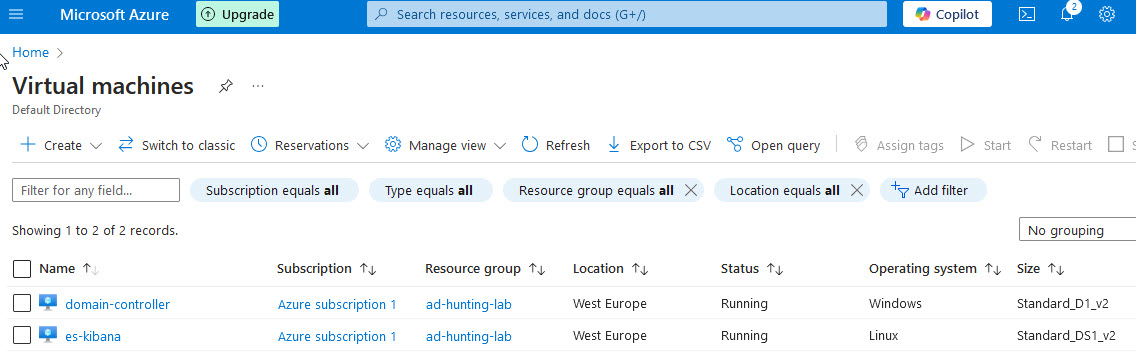
Now this does not mean that terraform didn't create any systems, it absolutely did. 


  What it does mean is that Ansible was not able to configure them, which is 1/2 of the solution. I'm running this from the windows command line (yes I could do this in linux or on a mac but the point is many of you are running on windows) so I need to modify what Ansible is calling out to so this will work. 

I've been looking up solutions that are portable (make a PR back to adaz when I'm done) but so far the quick help from google and chat gpt 4o haven't seen my newly defined windows variables carry over. So I'm going to try again tomrrow with o1 and see if we can figure it out!


Also Read: 

Project Adaz testing part 1

Project Adaz testing part 3


Daily Blog #719: Installing project adaz


Hello Reader,

Following up on our last post, I’m now testing the installation process for Project Adaz to see if it’s still functional. While the project is marked as "maintained," confirming it’s installable on a Windows 11 system is a different matter entirely.

Below are my updated installation instructions to ensure a smoother setup:


Updated Installation Instructions for Project Adaz

  1. Clone the Repository
    Assuming you already have Git installed, create a directory for the project, then run the following command:

    git clone https://github.com/christophetd/Adaz.git
    
  2. Set Up the Python Environment
    Navigate to the newly created adaz directory and execute the following commands:

    python3 -m venv ansible/venv
    ./ansible/venv/bin/activate
    pip install -r ./ansible/requirements.txt
    deactivate
    
  3. Prepare Terraform
    Download Terraform and extract it to the terraform directory within the adaz project folder.

  4. Initialize Terraform
    Run the following commands:

    cd terraform
    terraform init
    
  5. Set Up Azure CLI
    Ensure the Azure CLI is installed and log in to your desired Azure account using:

    az login
    
  6. Generate an SSH Key (if needed)
    If you don’t already have an SSH key, generate one and store it in the .ssh directory. On Windows 11, run the following command in the terminal:

    ssh-keygen
    

    Make sure to name the key id_rsa and avoid accepting the default name.

  7. Apply Terraform Configuration
    Navigate to the terraform directory and execute:

    terraform apply
    

Once these steps are complete, Terraform will build an Active Directory-enabled network with an ELK log forwarder to support your project needs.

Tomorrow we can see if it was succesful.

Also Read:

Daily Blog #718: Building test environments in 2025

Hello Reader,

A while back, I shared a post on LinkedIn about building test environments for simulating attacks and creating better training datasets. This is something I’ve done extensively for both my coworkers and my SANS students. With the discontinuation of Detection Lab several years ago, I started exploring alternatives. After reviewing the issues section of Detection Lab and consulting ChatGPT O1, I’ve identified two promising replacements that are currently being maintained:


1. Project ADAZ

Four years ago, Christophe Tafani-Dereeper joined us on the Forensic Lunch to discuss his Azure-supported project for spinning up instrumented networks for testing. According to his GitHub page, it’s still being actively updated. I’ll be revisiting Project ADAZ in my upcoming blog posts to see how it performs today and whether it still meets my needs as it did back then.

Key Features:

  • ELK Backend: Provides a robust and widely-used stack for log aggregation, analysis, and visualization.
  • Azure Integration: Leverages Azure to create and manage the test environment, making it ideal for organizations already invested in Microsoft’s ecosystem.
  • Open Source: Free to use, with full access to the source code for customization.

Limitations:

  • Azure Costs: While the software is free, the resources used on Azure (e.g., VMs, storage, bandwidth) can add up quickly.
  • Azure Dependency: It’s tightly coupled with Azure, which may not be ideal for those working with other cloud providers or looking for multi-cloud solutions.
  • Complexity: Initial setup and configuration may require familiarity with Azure, ELK, and Terraform.It is well documented though and I felt it easy to setup.

2. Splunk Attack Range

The Splunk Threat Research Team has developed an instrumented network-building script, specifically designed for collecting and analyzing logs with Splunk. It’s another compelling option for creating test environments.

Key Features:

  • Broad Platform Support: Works with VirtualBox, Azure, and AWS, offering flexibility across various deployment scenarios.
  • Splunk-Centric: Designed to send logs directly to Splunk, enabling quick analysis and visualization.
  • Actively Maintained: Updates and support from the Splunk Threat Research Team ensure compatibility with current Splunk releases and threat models.
  • Attack Simulations: Pre-configured to simulate adversary techniques using open-source tools like Atomic Red Team, enabling realistic threat scenarios.

Limitations:

  • Splunk Dependency: Works best with Splunk as the log receiver, making it less attractive for organizations using alternative log aggregation solutions like ELK.
  • Resource Requirements: Environments built with Splunk Attack Range can be resource-intensive, requiring significant compute and storage, especially for larger simulations.
  • Learning Curve: Requires familiarity with Splunk configurations and potential tuning for specific use cases.

What’s Next?

I’ll be deploying both of these solutions in my test environments to compare their performance, usability, and suitability for various scenarios. Additionally, I’m on the lookout for robust Terraform scripts to build similar environments with cloud-based identity providers (e.g., Azure AD or Google Cloud Identity) instead of traditional local Active Directory.

If you know of any such scripts or have experience with either of these projects, please share your thoughts in the comments below—I’d love to hear your insights!


Also Read: Getting free Azure credits for testing