The Most/Recent Articles

Showing posts with label rhel. Show all posts

Daily Blog #262: Extending mlocator RHEL Forensics Part 6

Extending mlocator RHEL Forensics Part 6


Hello Reader,
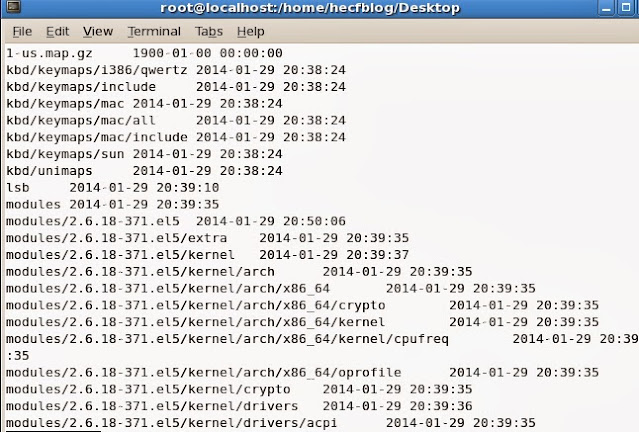
        I'm working on changing up Hal's mlocator and mlocate-time scripts to work to recover and parse unallocated mlocate entries. I'm having a bit of success as you can see with the following scrren shot that I am successfully recovering dates associated with file entries from hits found by mlocator.

Extending mlocator RHEL Forensics Part 6

Right now I'm running two scripts to do this, Hal's mlocator modified to convert the hex back to ascii and then writing it out to a file and then Hal's mlcoate-time modified to not look for the beginning of a mlocate database. I'm having some success but it's hanging 1/9 of the way through the 9mbs of mlocate data recovered just from group 33. This is good because my current mlocate database is only 3mb!

I'll keep on working on this and provide another update tomorrow with the ultimate goal of combining the two scripts into one that can be used to carve all mlocate database entries from a disk and print the parsed output.

Also Read: 

Daily Blog #261: RHEL Forensics Part 5 Testing Hal's Mlocator

RHEL Forensics Part 5 Testing Hal's Mlocator

Hello Reader,
             So I decided to test Hal Pomeranz's mlocator perl script today. Here's what I did, what I saw and what I'm thinking now.

What I did:
1. I downloaded the script, this wasn't easy with hotel wifi
2. I looked up the inode blocks that belong to the group that the mlocate directory is in again, which is still blocks 1081344 - 1114111 for group 33.
3. I ran mlocator with the following options:
mlocator.pl /dev/mapper/VolGroup00-LogVol00 1081344 1114111

where /dev/mapper/VolGroup00-LogVol00 is my partition
1081344 is the beginning block of group 33 where mlocate.db exists
1114111 is the last block of group 33 where mlocate.db exists

 What I saw:
I got this cool output


RHEL Forensics Part 5 Testing Hal's Mlocator

What I'm thinking now:
I need to extend Hal's script so that it will extract those hits to a file so I made a modification that would write out all the hits stored in the $bytes variable back to ascii to a file. Here is what that file looks like viewed in xxd:

RHEL Forensics Part 5 Testing Hal's Mlocator

 So we have good data, now I need to modify mlocate-time to be able to parse these file names and timestamps outside of the standard allocated database structure. I'll be giving that a try tomorrow and I'll post my results here.

This is what I believe long term, every filename with a timestamp we can recover (whether contiguous blocks from a known database/time or not) is valuable to provide intelligence on what existed at any point in time in the past.

Also Read: 

Daily Blog #255: RHEL Forensics Part 4: More on mlocate.db

RHEL Forensics Part 4: More on mlocate.db by David Cowen

Hello Reader,
    Today we have something special, a guest post from Hal Pomeranz. One of the best parts of sharing research and information is when others come back and extend their work for the benefit of us all. Today Hal Pomeranz has kindly not only shared back his work in extending the idea of recovering mlocate database's from unallocated space, he's written a tool to do so! I'll be testing Hal's tool on my test image and post those results tomorrow. In the mean time enjoy this very well written post!

If you want to contact Hal go to http://deer-run.com/~hal if you want train with Hal he is an excellent instructor with SANS http://www.sans.org/instructors/hal-pomeranz. Hal is an awesome forensicator and community resource who also is willing to 1099 to those of you like myself that run labs that are looking to extend our capabilities.

You can download the new tool has has made here: https://mega.co.nz/#!TsoTlSjR!BMz7BQqOhCeLGumWu51kaw4v_VFxd6UT3lyqu-ljUdc

With all that said, here is today's guest post from Hal. 

Hal Pomeranz, Deer Run Associates

One of the nice things about our little DFIR community is how researchers build off of each other’s work.  I put together a tool for parsing mlocate.db files for a case I was working on.  David Cowen and I had a conversation about it on his Forensic Lunch. David had some questions about whether we could find previous copies of the mlocate.db in unallocated blocks, and wrote several blog posts on the subject here on HECF blog.  David’s work prompted me to do a little work of my own, and he was kind enough to let me share my findings on his blog.

Hunting mlocate.db Files

In Part 3 of the series, David suggested using block group information to find mlocate.db data in disk blocks.  My thought was, since the mlocate.db files have such a clear start of file signature, we could use the sigfind tool from the Sleuthkit to find mlocate.db files more quickly.
# sigfind -b 4096 006D6C6F /dev/mapper/RD-var
Block size: 4096  Offset: 0  Signature: 6D6C6F
Block: 100736 (-)
Block: 141568 (+40832)
Block: 183808 (+42240)
Block: 232192 (+48384)
Block: 269312 (+37120)
Here I’m running sigfind against my own /var partition.  006D6C6F” is “mlo” in hex, the first four bytes of a mlocate.db file (sigfind only allows a max of 4-byte signatures).  I’m telling sigfind to look for this signature at the start of each 4K block (“-b 4096”).  As you can see, sigfind actually located five different candidate blocks. 
What was interesting to me was the blocks are in multiple different block groups in the file system.  As David suggested in Part 3, the EXT file system normally tries to place files in the same block group as their parent directory.  But when the block group fills up, the file can be placed elsewhere on disk.
I wanted to make sure that these were all legitimate hits and not false-positives.  So I used a couple of other Sleuthkit tools and a little Command-Line Kung Fu:
# for b in 100736 141568 183808 232192 269312; do
    echo ===== $b;
    blkstat /dev/mapper/RD-var $b | grep Allocated;
    blkcat -h /dev/mapper/RD-var $b | head -1;
done
===== 100736
Not Allocated
0    006d6c6f 63617465 00000127 00010000 .mlo cate ...' ....
===== 141568
Not Allocated
0    006d6c6f 63617465 00000127 00010000 .mlo cate ...' ....
===== 183808
Not Allocated
0    006d6c6f 63617465 00000127 00010000 .mlo cate ...' ....
===== 232192
Not Allocated
0    006d6c6f 63617465 00000127 00010000 .mlo cate ...' ....
===== 269312
Allocated
0    006d6c6f 63617465 00000127 00010000 .mlo cate ...' ....
The blkcat output is showing us that these all look like mlocate.db files.  Since block 269312 is “Allocated”, that must be the current mlocate.db file, while the others are previous copies we may be able to recover.

Options for Recovering Deleted Files

Let’s review our options for recovering deleted data in older Linux EXT file systems:
·         For EXT2, use ifind from the Sleuthkit to find the inode that points to the unallocated block that the mlocate.db signature sits in.  Then use icat to recover the file by inode number.

·         For EXT3, the block pointer information in the inode gets zeroed out.  My frib tool uses metadata in the indirect blocks of the file to recover the data (actually, we could use frib in EXT2 as well).
Unfortunately, I’m dealing with an EXT4 file system here, and things are much harder.  Like EXT3, much of the EXT4 inode gets zeroed out when the file is unlinked.  But EXT4 uses extents for addressing blocks, so we don’t have the indirect block metadata to leverage with a tool like frib. You’re left with trying to “carve” the blocks out of unallocated.
However, our carving is going to run into a snag pretty quickly.  Take a look at the istat output from the current mlocate.db file:
# ls -i /var/lib/mlocate/mlocate.db
566 /var/lib/mlocate/mlocate.db
# istat /dev/mapper/RD-var 566
inode: 566
Allocated
[…]

Direct Blocks:
269312 269313 269314 269315 269316 269317 269318 269319
[…]
270328 270329 270330 270331 270332 270333 270334 270335
291840 291841 291842 291843 291844 291845 291846 291847
[…]
The first 1024 blocks of the file are contiguous from block 269312 through 270335. But then there’s a clear gap and we’re starting a new extent with block 291840.  If we had to carve this file, we’d have a significant problem because the file is fragmented.  And unfortunately, all of the mlocate.db files I’ve examined in my testing contained multiple extents.
We could certainly get useful information from the start of the file:
# blkcat /dev/mapper/RD-var 232192 1024 >var-232192-1024
# mlocate-time var-232192-1024
/etc 2014-03-01 09:47:12
/etc/.java 2013-05-09 16:15:05
/etc/.java/.systemPrefs    2013-05-09 16:15:05
/etc/ConsoleKit 2013-05-09 16:15:05
/etc/ConsoleKit/run-seat.d 2013-05-09 16:15:05
/etc/ConsoleKit/run-session.d   2013-05-09 16:15:05
/etc/ConsoleKit/seats.d    2014-01-31 11:11:35
[…]
/home/hal/SANS/framework/data/msfweb/vendor/rails/actionpack/test/fixtures/addresses/.svn/prop-base 2013-05-09 18:52:29
/home/hal/SANS/framework/data/msfweb/vendor/rails/actionpack/test/fixtures/addresses/.svn/props     2013-05-09 18:52:29
/home/hal/SANS/framework/data/msfweb/vendor/rails/actionpack/test/fixtures/addresses/.svn/text-base 2013-05-09 18:52:30
/home/hal/SANS/framework/data/msfweb/vendor/rails/0.556:avahi-daemon
0.564:bluetooth
0.584:ufw
0.586:smbd
[…]
I use blkcat here to dump out 1024 blocks from one of the unallocated mlocate.db signatures, and then hit it with my mlocate-time tool.  Things go great for quite a while, but then we clearly run off the end of the extent and into some unrelated data.  I was able to pull back almost 6,000 individual file entries from this chunk of data, but the current mlocate.db file on my system has over 35,000 entries.

Looking for Another Signature

The fragmentation issue got me wondering if there was some signature I could use to find the other fragments of the file elsewhere on disk.  Here’s a relevant quote from the mlocate.db(5) manual page (emphasis mine):
The  rest  of  the  file until EOF describes directories and their contents.  Each directory starts with a header: 8 bytes for directory time (seconds) in  big  endian, 4 bytes for directory time (nanoseconds) in big endian (0 if unknown, less than 1,000,000,000),  4  bytes  padding, and  a  NUL-terminated  path name of the the directory.  Directory contents, a sequence of file entries sorted by name, follow.
Examining several mlocate.db files, the 4 bytes of padding are nulls, and the directory pathname begins with a slash (“/”).  So “000000002f” is a 5-byte signature we could use to look for directory entries in mlocate.db file fragments.
sigfind doesn’t help us here, because it wants to look for a signature at the start of a block or at a specific block offset.  Since I needed to look for the signature anywhere in a block, I threw together a quick and dirty Perl script for finding our signature in a disk image.  I haven’t done a significant amount of testing, but early indications are:
·         False positives can be a problem—a series of nulls followed by a slash is unfortunately common in data in a typical Linux file system.  In order to combat this, I’ve added a threshold value that requires a block to have a minimum of 6 instances of our signature before being reported as a possible mlocate.db chunk (the threshold value is configurable on the command-line).

·         False-negatives are also an issue.  If a directory contains a large number of files (think /usr/lib), then the directory contents may span multiple blocks.  That means one or two blocks with no instances of our “start of directory entry” signature, even though those blocks actually are part of a mlocate.db fragment.
That being said, the script does do a reasonable job of finding groups of blocks that are part of fragmented mlocate.db files.  With a little manual analyst intervention, it appears that it would be possible to reconstitute a deleted mlocate.db from an EXT4 file system, assuming none of the original blocks had been overwritten.
Frankly, our signature could be a little better too.  It’s not just “four nulls followed by a slash”, it’s “four nulls followed by a Linux path specification”.  Using a regular expression for this would likely reduce the false-positives problem plaguing the current script.

Wrapping Up (For Now)

I’ve had fun getting a deeper understanding of mlocate.db files and some of the challenges in trying to recover this artifact from unallocated.  But I still see some open questions. Can we improve the fidelity of our file signature to eliminate false-positives?  And given that there are chunks of at least five different mlocate.db files scattered around this file system, would we be able to put the correct chunks back together to recover the original file(s)?  Perhaps David or somebody else in the community would like to tackle these issues.

Also Read:

Daily Blog #221: RHEL Forensics Part 3

RHEL Forensics Part 3 by David Cowen HECF Blog

Hello Reader,
        Today we talk about recovering deleted mlocate databases. This was actually harder than I expected as not only did ext3 set the size of the file equal to 0 but the direct block that istat -B came back with was not the first block in our database. So instead I followed the instructions here: http://wiki.sleuthkit.org/index.php?title=FS_Analysis to do a manual recovery of deleted databases. There is still some work to be done here in order to clean up whats been recovered back into parsable databases but I'll leave that bit for next week.

Today let's go through the steps necessary to recover deleted mlocate databases on a RHEL v5 system using Ext3 as the file system. Remember this is necessary as the updatedb command runs daily and deletes the mlocate database before creating a new one.

Step 1. We need to figure out which group of inodes our parent belongs to. You can see in the screenshot below that the parent directory /var/lib/mlocate has inode number 1077298 so that is the group we need to find.

RHEL Forensics Part 3 by David Cowen HECF Blog


Step 2. Run fsstat to find out which group contains our inode, in this case Group 33 contains our inode as shown below. We can use them to determine which blocks to recover for deleted databases.

RHEL Forensics Part 3 by David Cowen HECF Blog


Step 3. Use blkls to recover those unallocated blocks within Group 33 as shown below to a new file:

RHEL Forensics Part 3 by David Cowen HECF Blog

Step 4. Use xxd to parse the recovered blocks and  find the mlocate database signature of 'mlocate'.

RHEL Forensics Part 3 by David Cowen HECF Blog  

This looks like an mlocate database but right now its stuck in the middle of the rest of the unallocated data. So the next thing we need to do next week as we continue this series is to write some code to carve out the mlocate database from this unallocated block chunk. 

Make sure to come back tomorrow for the Forensic Lunch with guests Ian Duffy and Andrew Case!


Daily Blog #220: RHEL Forensics Part 2

RHEL Forensics Part 2 by David Cowen

Hello Reader,
             Yesterday we talked about extending this weeks Sunday Funday answer using the mlocate database on RHEL. Today let's look at what we can determine from the mlocate database using Hal Pomeran'z mlocate-time script and setup tomorrow's entry regarding the recovery of deleted mlocate databases.

mlocate, default on RHEL since v4, queries a database of known files and directories called /var/lib/mlocate/mlocate.db. The database stores the full path to every file and directory it encounters as well as the timestamps of the directories. The timestamp according to the man page will be either the change time or modification time of the directory, whichever is more recent. The timestamp is being kept to determine if during the update process if mlocate should re-index the contents of a directory. This leads to the question, will timestamp manipulation get around mlocate indexing of a file's existence, which is something we can test in this series.

For today's example I have created a file in my home directory called 'secret_file' and then deleted it.

RHEL Forensics Part 2 by David Cowen

Since this filesystem is ext3 the name of the file 'secret_file' is now zero'd out within the directory inode. The only way to know it existed is to hope that there is another recent reference to the file within the ext3 journal to re-associate it or to search the mlocate database. There may be other artifacts but we will focus on those two for the moment.

Searching the mlocate database confirms the file entry still exists:

RHEL Forensics Part 2 by David Cowen

Looking into the parsed database records shows the last time the directory was modified when the file still existed within it:

RHEL Forensics Part 2 by David Cowen

So that's great we can establish a timeframe when the file did exist and we could compare the contents of the current filesystem against the mlocate database to determine which files had been deleted since the last daily cron run. This can be helpful for determining what has changed in the last day in a live response scenario. This does not help though when we want to know what is occurring on a longer term basis.

The mlocate database is updated by default once daily when /etc/cron.daily/mlocate.cron runs and execute updatedb. What Hal pointed out from his tests though is that when that updatedb command runs that it does not overwrite the database but instead unlinks (deletes) it and then creates a new one. We can see that in the following screenshots showing the inode numbers of the mlocate database.

Before updatedb:

RHEL Forensics Part 2 by David Cowen

After updatedb:

RHEL Forensics Part 2 by David Cowen

Notice that the inode number of mlocate.db has changed from 1077692 to 1077693 meaning a new inode has been created and the old inode is still recoverable. As Hal also pointed out the mlocate database has a unique signature that can make determining which deleted inodes contain mlocate databases so tomorow let's do that. Let's see if we can make a quick script that will find and recovery deleted mlocate databases for longer historical comparisons of which files existed on our system.

Also when I'm done with this series I'll be uploading my test image for download so you'll be able to recover the same data! Come back tomorrow and through the rest of this series as we determine:

1. How to identify and recover inodes containing mlocate databases.

2. Examining the possibility of carving mlocate database entries from freespace.

This is a 6-part series. Also Read:

Daily Blog #219: RHEL Forensics Part 1

RHEL Forensics Part 1 by David Cowen - HECF Blog

Hello Reader,
      If you read this weekends Sunday Funday winning answer you learned a lot about how to do forensics on a redhat enterprise linux server. As with anything we do in digital forensics though, there is always more to learn. Today we start a series on what we can do to go beyond this weeks winning answer, which was very good. Let's start by looking into a tool that Hal Pomeranz introduced us to on last weeks Forensic Lunch.

Hal's tool, mlocate-time, allows us to parse the mlocate database for all of the files, directories and timestamps for all files that existed on the system as of the last mlocate database update. By default there is a chron job that is set to run daily to update the mlocate database so the live data will only contain those files that existed since the last daily cron job run. Comparing the files known to exist in the mlocate database to the files live on the current system can reveal files that have been deleted, but what we want to look at is the recovery of past mlocate databases. There are two sources for these:

1. Hope there are backups of the system stored somewhere. From the backups we can extract out all copies of the mlocate database and then parse them with Hal's tool.

2. Recover the deleted inode or carve them out of unallocated space. While on the lunch Hal tested and confirmed that each time the database is updated it deletes the old database and creates a new one. That means that all the old locate databases and their timestamps are either recoverable inodes or carvable data blocks allowing you to bring back the proof of the prior existence of files and timestamps on your system. This is not just true for RHEL but other linux distributions making use of mlocate as well.

Tomorrow let's get into what the data contained with mlocate can do for our investigation and end with some mlocate database reovery. I'm downloading a RHEL v5 evaluation iso tonight to start my tests!

Continue Reading: